
Upsells and bundles
Set up a bundle: products bought together for less
Put two to five products in a set with a percent or amount off, shown on each product's page with Add all to cart and finished in the cart.
Updated 2 min read
On this page
A bundle is a set of two to five of your products at a better price together. Each product's page shows the set, its price together and Add all to cart. A buyer who has only part of the set in the cart is shown the rest, with what they'd save.
Make a bundle
- Open Products > Upsells and bundles and press New offer (or Create bundle).
- Pick Bundle.
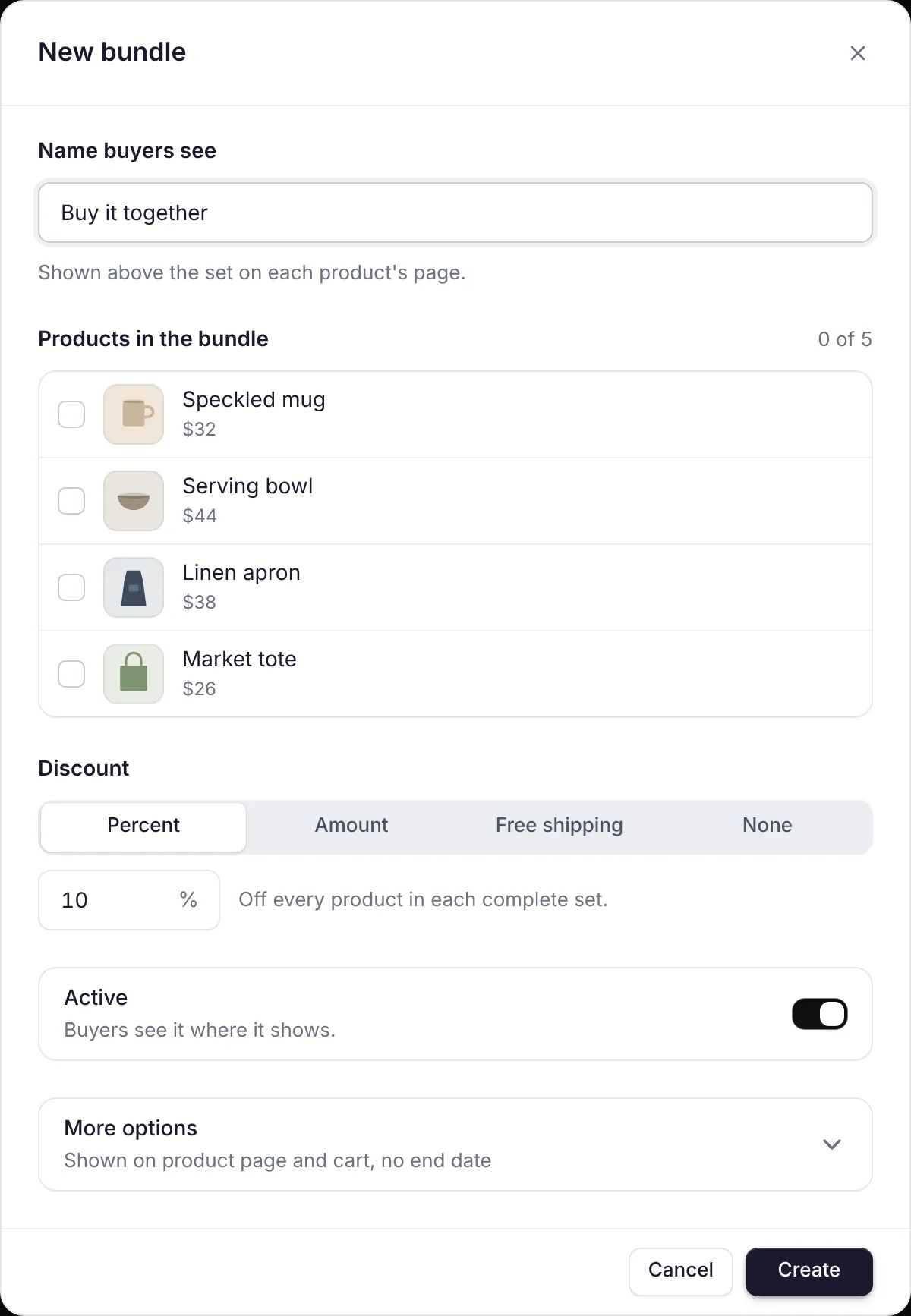
- Type the Name buyers see, like Breakfast set.
- Under Products in the bundle, tick two to five products.
- Choose the Discount: Percent comes off every product in each complete set, Amount comes off each complete set, and None shows the set at its normal price. Free shipping, where selling things that ship is available, makes the whole order ship free once the set is in the cart.
- Product page and Cart are both ticked. To change that, open More options and use Show it on.
- Under the discount it says what the set costs, like The set costs $68.40 instead of $76.00.
- Press Create. You're back on Upsells and bundles, with the new bundle in the list.
What the buyer sees
- On each product's page: the products in the set, This item first, then Together with both prices and Add all to cart. The product the buyer is on goes in with the option they picked; another product with options gets a small choice of its own.
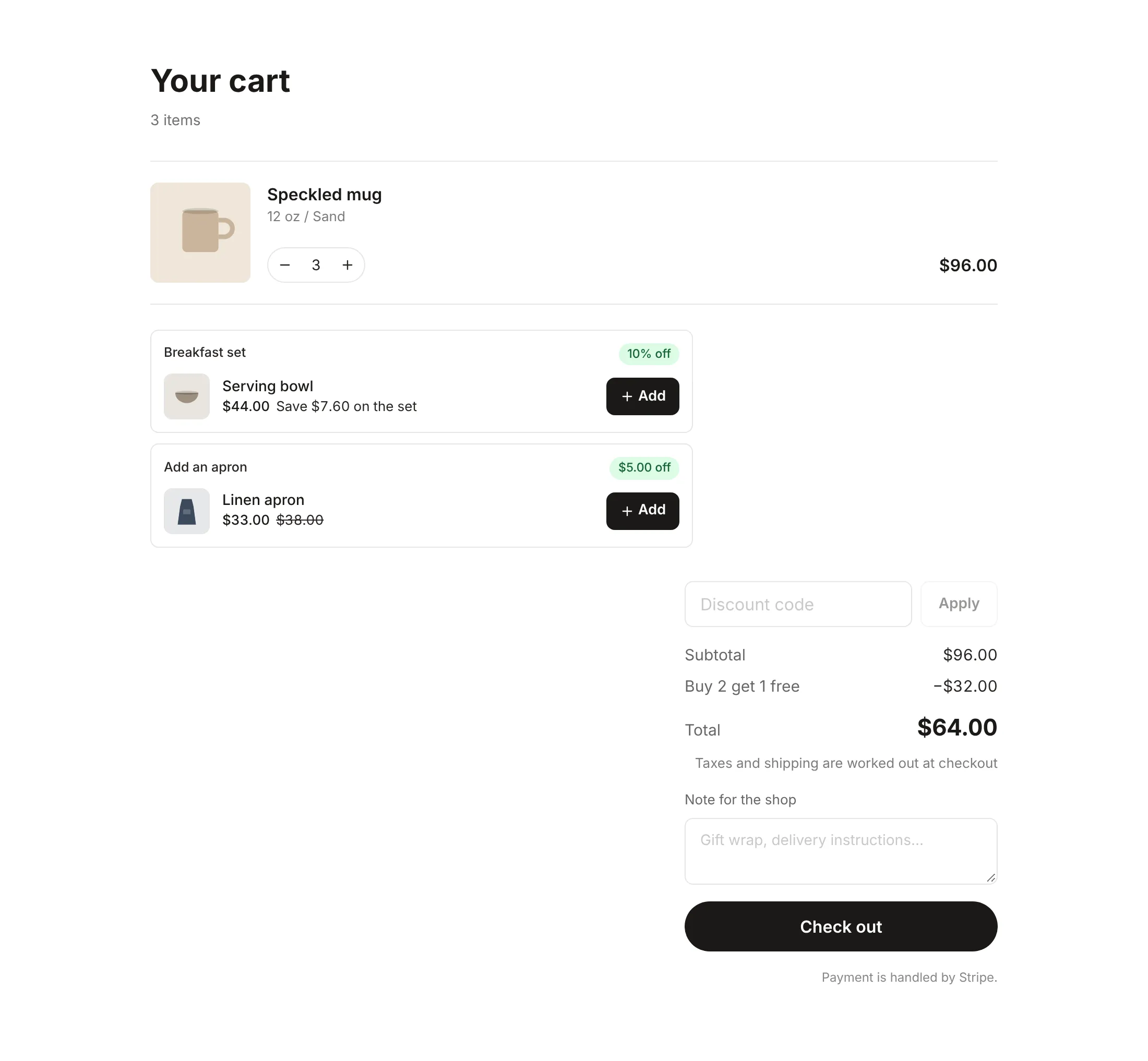
- In the cart: with part of the set in it, a row with the missing products, Save on the set, and Add.
- At checkout: the saving as its own line under the subtotal, named as you named the bundle.
Good to know
- Every complete set gets the discount: two mugs and two bowls are two sets. Set Discounted sets per order under More options to stop at a number.
- An amount off is shared across the set's products by their price.
- A pay what you want product can be in a bundle. It counts toward the set, but its price is never discounted: the rest of the set takes the discount.
- A bundle shows only while every product in it is published.
- A bundle is never added at checkout in one press. It's completed on a product page or in the cart.
More in Upsells and bundles
- Upsells and bundles: the three kinds of offer
- Set up a quantity break: buy more, pay less
- Set up an upsell: one more product at a lower price
- Show offers on your website: product page, cart and checkout
- How offers are priced: codes, currency and language
- Upsells and bundles: common problems and fixes
Related articles
- Upsells and bundles: the three kinds of offerQuantity breaks, bundles and upsells: what each one does for a buyer, where it shows, and how Storelib prices it in the cart and at checkout.
- Show offers on your website: product page, cart and checkoutThe Bundles and upsells block, Featured products and Product spotlight, an imported theme's block, and what the cart and checkout show by themselves.
- Upsells and bundles: common problems and fixesAn offer that doesn't show, doesn't apply, or applies differently than you expected, and what to change.
- How offers are priced: codes, currency and languageWhich offer wins when two want the same item, how offers and discount codes add up, and what happens in another currency or language.
Still stuck? Contact support and a person on the team replies by email. Selling on Storelib? Open a request from your dashboard.