
Upsells and bundles
Set up a quantity break: buy more, pay less
Give one product, or every product in a collection, tiers like Buy 2 get 1 free or 4 for 30% off, shown as choices on the product page.
Updated 3 min read
On this page
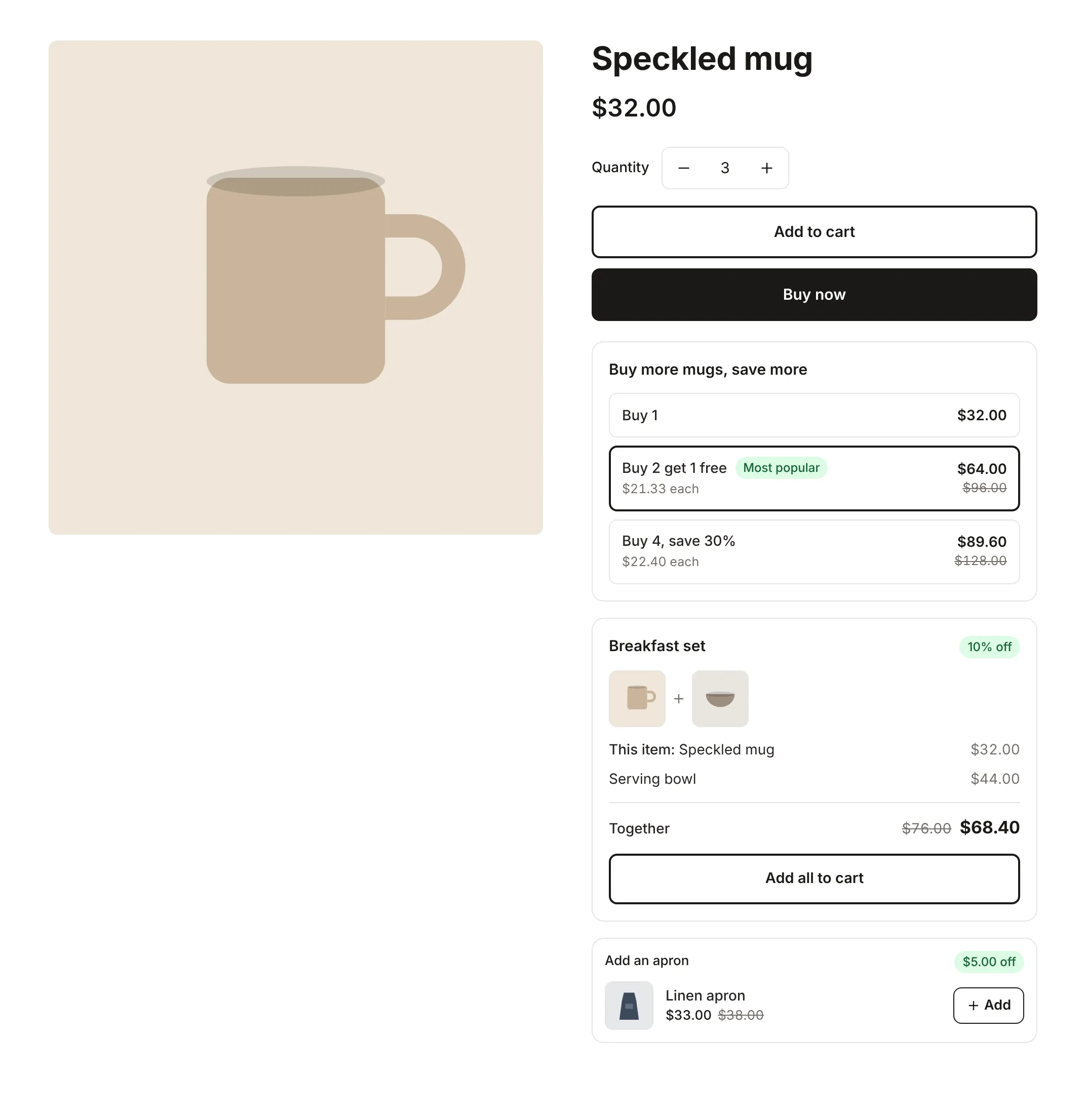
A quantity break rewards buying more of one product. On the product page the buyer sees each tier as a choice with its total. Picking one sets the quantity, and the cart and the checkout charge exactly the total the tier showed.
Make a quantity break
- Open Products > Upsells and bundles and press New offer (or Create quantity break if you have no offers yet).
- Pick Quantity break.
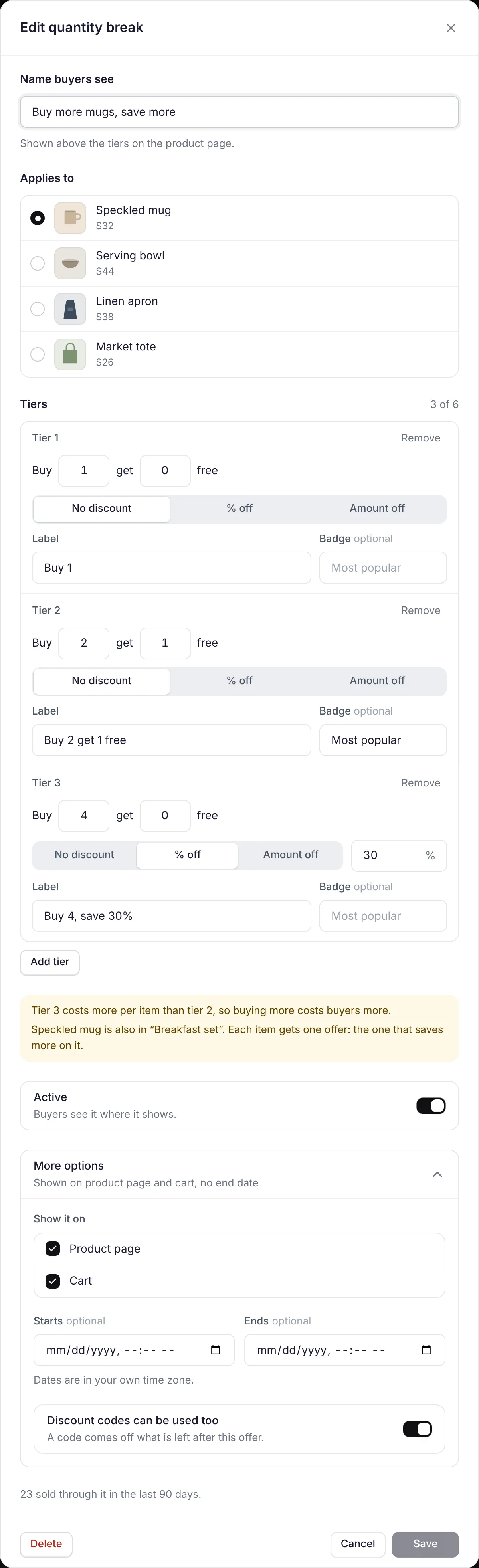
- Type the Name buyers see. It's the heading above the tiers, like Buy more mugs, save more.
- Under Applies to, pick the product. If you have collections, you can choose A collection instead: every product in it gets the same tiers, each at its own price.
- Set the tiers, pressing Add tier for each one after the first. Each has Buy (how many they pay for), Free (how many come free), and a Discount of None, Percent off or Amount off on the ones they pay for.
- Leave Label empty to use the tier's own words, like Buy 2 get 1 free, or type your own. Add a short Badge, like Most popular, to one tier if you want.
- Check the yellow notes, if there are any. Tier 3 costs more per item than tier 2 means a bigger tier is worse value.
- Press Create. You're back on Upsells and bundles, with the new offer in the list.
The rules for tiers
- Up to six tiers. Buy is 1 to 99, Free is 0 to 10, a percent is up to 90.
- Each tier needs more units than the one above it (what they pay for and what's free, together).
- At least one tier has to give something: free units or a discount. A plain Buy 1 tier is fine as the first choice.
- Every unit of the product in the cart counts, whatever its option, color or size.
How units are counted
The cart is split into the biggest tier that fits, again and again, then the next one down. Units that fit no tier pay full price. With tiers of 2 + 1 free and 3 + 2 free, five mugs are one 3 + 2 block, so the buyer pays for 3. Eight mugs are a 3 + 2 block and a 2 + 1 block, so they pay for 5. When the units have different prices, the free ones are the cheapest.
Check it before you save
Each tier's own words, like Buy 2 get 1 free, are what the product page shows when Label is empty. The product page and the checkout work out every price from the same formula, so a tier's total there is the total the buyer pays.
Watch the yellow notes. Tier 3 costs more per item than tier 2 means a bigger tier is worse value: 3 mugs for $64.00 is $21.33 each but 4 for $89.60 is $22.40 each. Raise the bigger tier's discount until it costs less per item.
More in Upsells and bundles
- Upsells and bundles: the three kinds of offer
- Set up a bundle: products bought together for less
- Set up an upsell: one more product at a lower price
- Show offers on your website: product page, cart and checkout
- How offers are priced: codes, currency and language
- Upsells and bundles: common problems and fixes
Related articles
- How offers are priced: codes, currency and languageWhich offer wins when two want the same item, how offers and discount codes add up, and what happens in another currency or language.
- Upsells and bundles: common problems and fixesAn offer that doesn't show, doesn't apply, or applies differently than you expected, and what to change.
- Set up an upsell: one more product at a lower priceSuggest one product on product pages, in the cart and at checkout when the cart holds the products you choose, with a percent or amount off.
- Show offers on your website: product page, cart and checkoutThe Bundles and upsells block, Featured products and Product spotlight, an imported theme's block, and what the cart and checkout show by themselves.
Still stuck? Contact support and a person on the team replies by email. Selling on Storelib? Open a request from your dashboard.