
Set up your store
Store details: logo, name, contact email, country and currency
What buyers see on receipts, order emails and checkout, where your store is based and the currency it sells in. Set it once in Settings > Store details.
Updated 2 min read
On this page
Store details is who your store is to your buyers. It takes two minutes, and it shows on every receipt, order email and checkout.
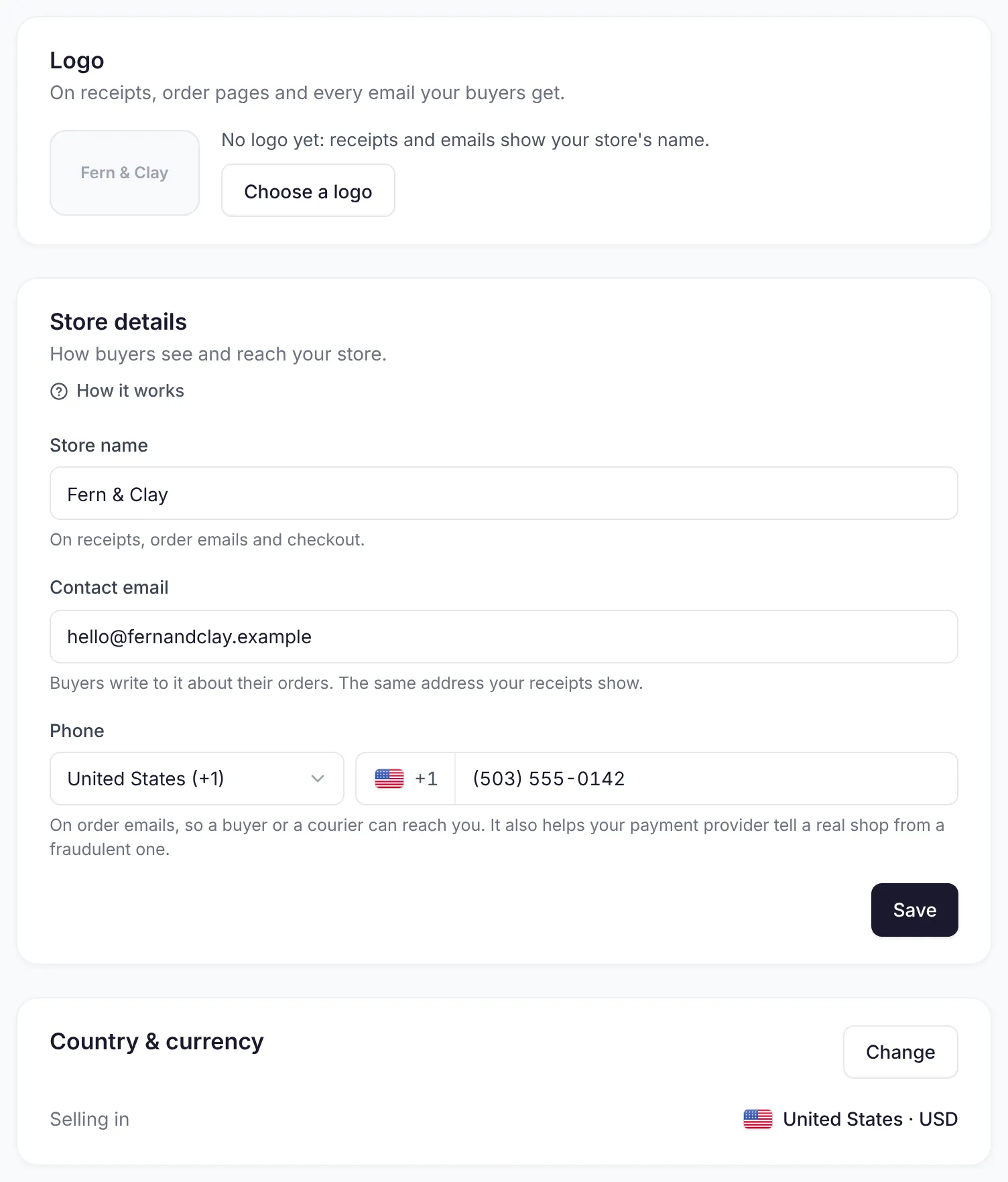
Fill it in
- Open Settings and choose Store details.
- Under Logo, press Choose a logo and pick a picture. It goes at the top of receipts, order pages and every email your buyers get.
- Type your Store name. Receipts, order emails and checkout say the order is from this name.
- Type a Contact email. Buyers write to it about their orders, and it's the address on your receipts.
- Add a Phone number if you want buyers and couriers to reach you. Pick the country code first.
- Press Save.
- Under Country & currency, the line Selling in shows your country and currency. Press Change to set them in Settings > Languages & Currency. See Set your store currency.
What each one changes
| Field | Where buyers see it |
|---|---|
| Logo | Receipts, the order page and every customer email. With no logo, your website's logo is used, then your profile photo. |
| Store name | Receipts, order emails and the top of checkout. Empty, your Storelib name is used. |
| Contact email | Receipts and order emails. Replies to order emails go here. |
| Phone | Order emails, so a buyer or a courier can call. |
| Country | Nowhere directly. It's where new locations and tax start, and it suggests your currency. |
| Currency | Every price on your website, on Explore and at checkout. Buyers pay in it, unless they're shown one of your More currencies. |
Where orders ship from
With more than one location, a last card picks your Default location. New orders are assigned to it and its stock goes down, unless a product says otherwise. With one location, every order ships from there. See Locations.
Store name and Contact email start filled in from your account. They're only saved when you press Save.
Changing the currency later asks what happens to the prices you already have. See Set your store currency.
More in Set up your store
- Cash on delivery: take payment when the order arrives
- Checkout settings: what checkout asks for
- What buyers see at checkout
- Customer accounts on your website
- Sales channels: where your products are listed
- Put your store on your own domain
Related articles
- Checkout settings: what checkout asks forChoose the name fields, company, phone and address line 2, the news box, checkout reminders, and whether buyers sign in first.
- Customer emails: what your buyers get, and whenOrder confirmation, shipping, delivery, pickup, refunds, returns and the checkout reminder: when each goes and how to change its words.
- Locations: where your stock lives and ships fromAdd your home, studio, warehouse or partner as a location, choose who ships from it, and pick the default.
- What buyers see at checkoutYour website's checkout, step by step: on your own address, with your logo, and the card form inside the page.
Still stuck? Contact support and a person on the team replies by email. Selling on Storelib? Open a request from your dashboard.